September 12, 2026
·Jackson
Free Human Design Bodygraph Widget for Your Website
Embed a free Human Design chart calculator on WordPress, Squarespace, Wix, or Webflow. Two lines of HTML, true 88-degree Design math, lead capture built in.
If you read Human Design for a living, you already know the pattern. A visitor finds your site, gets curious, and goes off to one of the big free chart sites to "get their chart first." Most of them never come back, and the one that does has spent ten minutes on someone else's page, reading someone else's definitions, before they ever see your name again.
The fix is to cast the chart on your own site. A Human Design bodygraph widget lets a visitor enter their birth date, time, and place and get their full bodygraph right there on your page: defined and undefined centers, every gate and channel, Personality and Design. Computed at that moment, not looked up. And if you turn on the email gate, the visitor trades their email for the chart, so the lead is yours before the reading starts.
It is free on every OpenEphemeris account, including the free tier. Here is what it does, what it does not do, and what it costs.
Accurate Human Design charts have been oddly expensive to put on your own site, and oddly cheap to get wrong. The widget solves the Design chart at the true 88 degrees of solar arc, against NASA's ephemeris, and it costs you about ten cents a chart from a $5 top-up: no subscription, no plugin, nothing to maintain. That's the public side. For your own prep, the same engine is available as an MCP server you can plug into Claude or any MCP-capable assistant, so you can pull a client's bodygraph, transits, and connection chart into a conversation and workshop the reading before the session. Same math on both ends; one for your visitors, one for you.
— Jackson
Try the Human Design Widget
This is the real widget. Pick the bodygraph tab, enter birth details, and it renders here:
The Design Calculation Is Done Properly
Every Human Design chart is two charts: the Personality chart at the moment of birth, and the Design chart from about three months earlier. The Design moment is defined as the instant the Sun sat exactly 88 degrees of solar arc behind its natal position.
That is an angle, not a number of days. Because the Earth's orbit is elliptical, the Sun covers those 88 degrees in anywhere from about 86 to 93 days depending on the time of year. Tools that subtract a fixed 88 days land on the wrong moment, and a wrong Design moment can move the Moon two gates, flip a channel, and change a defined center.
The widget does not shortcut it. It solves the 88-degree instant directly against NASA JPL's DE440 ephemeris, the same planetary dataset used for deep-space mission planning, then computes all 26 activations from the exact positions. The full mechanics are in How Is a Human Design Chart Calculated? if you want to check our work.
What the Bodygraph Widget Shows
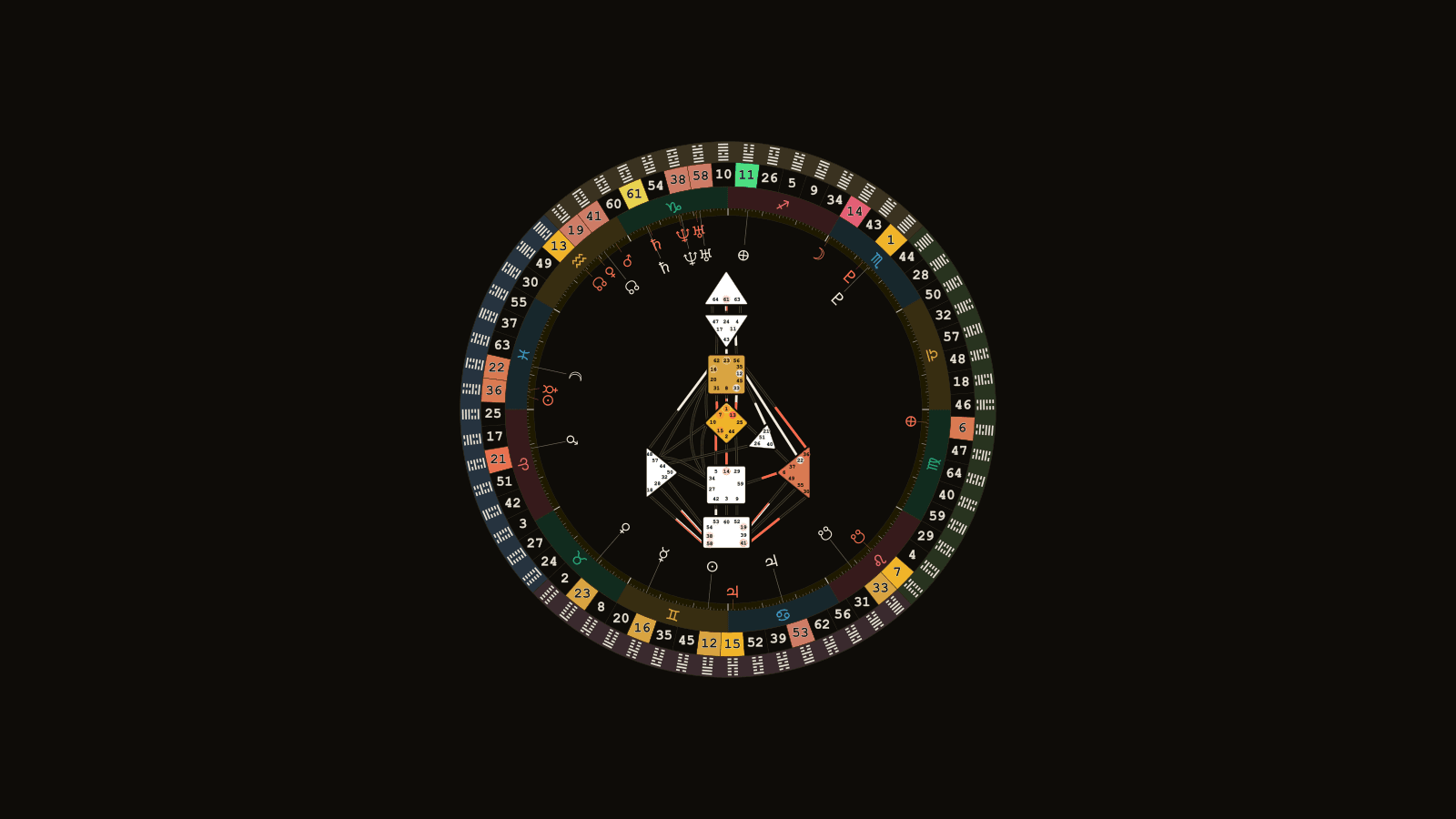
- Nine centers, defined or open, in the standard bodygraph layout. The chart is the graph itself, the way a practitioner reads it, not a text summary; type and authority are yours to interpret in the conversation that follows.
- All 64 gates and 36 channels, with Personality (black) and Design (red) activations marked.
- Two layouts. The classic bodygraph, or the mandala: the same graph nested inside the zodiac and gate wheel, so an astrologer's client can see where the activations sit on the ecliptic. More on the mandala here.
- Optional planet columns on either side, listing each body's gate and line for both charts, and optional variable arrows.
- Interactive mode: hover or tap a planet and an info card explains what it is.
- Your theme: light, dark, or mono, your accent color, your logo, your own intro headline and footer text.
Your visitor picks a location from the built-in place search, taps Generate, and the bodygraph appears in about two seconds. It scales cleanly on phones.
Lead Capture, Built In
Charts are the gift. Leads are the business.
Turn on the email gate and the widget asks for the visitor's email before the chart unlocks, with a consent checkbox that cannot be hidden or pre-ticked. No consent, no lead. The headline, button, and consent wording are yours to change.
Each consented lead arrives with the birth details attached. So your first message to a new prospect can already say something true about their chart: the defined centers, the channel that jumped out at you, the open center you would ask about first. That opens a conversation in a way "thanks for subscribing" never will.
Leads land in your dashboard immediately, are emailed to you within the hour, and export to CSV. On Pro they can also fire a webhook into Zapier or Make, which means they land in Mailchimp, Kit, Flodesk, or HubSpot without you copying anything. After 90 days we delete them from our side. Lead capture is included on the free tier, and lead submissions never cost credits.
Installing It (Two Lines, Any Platform)
<script async src="https://openephemeris.com/embed.js"
        data-widget="wg_..." data-pk="pk_..." data-height="720"></script>
The dashboard generates that with your widget ID filled in. It is async, so it never blocks your page, and it swaps itself for an iframe, so it cannot fight your theme's CSS or scripts.
| Platform | Where to paste |
|---|---|
| WordPress | A Custom HTML block (Gutenberg) or a Code element (Elementor) |
| Squarespace | A Code block, on the Business plan or higher |
| Wix | Settings → Custom Code, body end. Not the "Embed HTML" block, which sandboxes the script and breaks the domain check |
| Webflow | An Embed component |
| Showit | An Embed Code widget |
Every change you make in the dashboard afterwards (layout, theme, house system on the astrology tab, lead gate copy) goes live on your site the moment you save. The snippet never changes. Your publishable key is locked to your domain, so a copied snippet on someone else's site simply does not load.
If you would rather not touch your site, the dashboard gives you a pre-written email for whoever manages it, or a copy-paste instruction block for an AI coding agent that installs and verifies the widget for you.
What It Costs
Free on every account. The bodygraph widget (and the natal chart wheel) is included on the free tier, with lead capture. Free widgets carry OpenEphemeris branding: a small watermark on the chart and a "Powered by OpenEphemeris" link under the widget. That is the whole trade.
Pro ($29/month) adds the synastry bi-wheel, Zapier/Make webhook delivery, and white-label: one toggle removes the watermark and the link. It includes 75,000 credits a month.
Each bodygraph a visitor generates costs 3 credits. Loading the widget, the place search, and lead submissions are free. Failed renders are refunded.
A new free account starts with 150 credits, which is 50 charts. When they run out, top up $5 for 150 credits, $10 for 350, or $20 for 900. Top-up credits never expire, and there is no subscription to cancel. You pay for the charts your visitors actually generate and nothing while your site is quiet.
If the wallet does hit zero, the widget fails closed: visitors see a "temporarily unavailable" card until you top up, which applies instantly. There is no overage billing on the widget, so a busy month can never bill you past what you agreed to. You get an email when the balance runs low and another at zero, re-armed after every top-up, and a banner in the dashboard. If you have a widget installed the email says so, because for you it is not an API inconvenience, it is your public site going quiet.
Visitor birth data for a plain chart view is processed transiently: computed, rendered, and gone. It is stored only when a visitor consents to leave their details for you.
A Practitioner's Site That Casts Charts
A Human Design site usually works like a brochure. It explains the system, describes your approach, and waits. A bodygraph widget makes it work like the first five minutes of a session: the visitor arrives curious, leaves with their real chart, and the serious ones leave you their email on the way, attached to the exact birth data you need to open the conversation well.
Create a free account and the widget is configured in about five minutes. No card required.